Writing Rules
Rules are how you teach Osprey what to look for and what to do when it finds it. This page covers SML (“Some Madeup Language”), Osprey’s rule language: defining features with models, writing rules over them, and wiring rules to effects.
See also:
- Examples to apply all the concepts to complete, runnable rulesets
- Why a Bespoke Language? for more about SML and why it exists
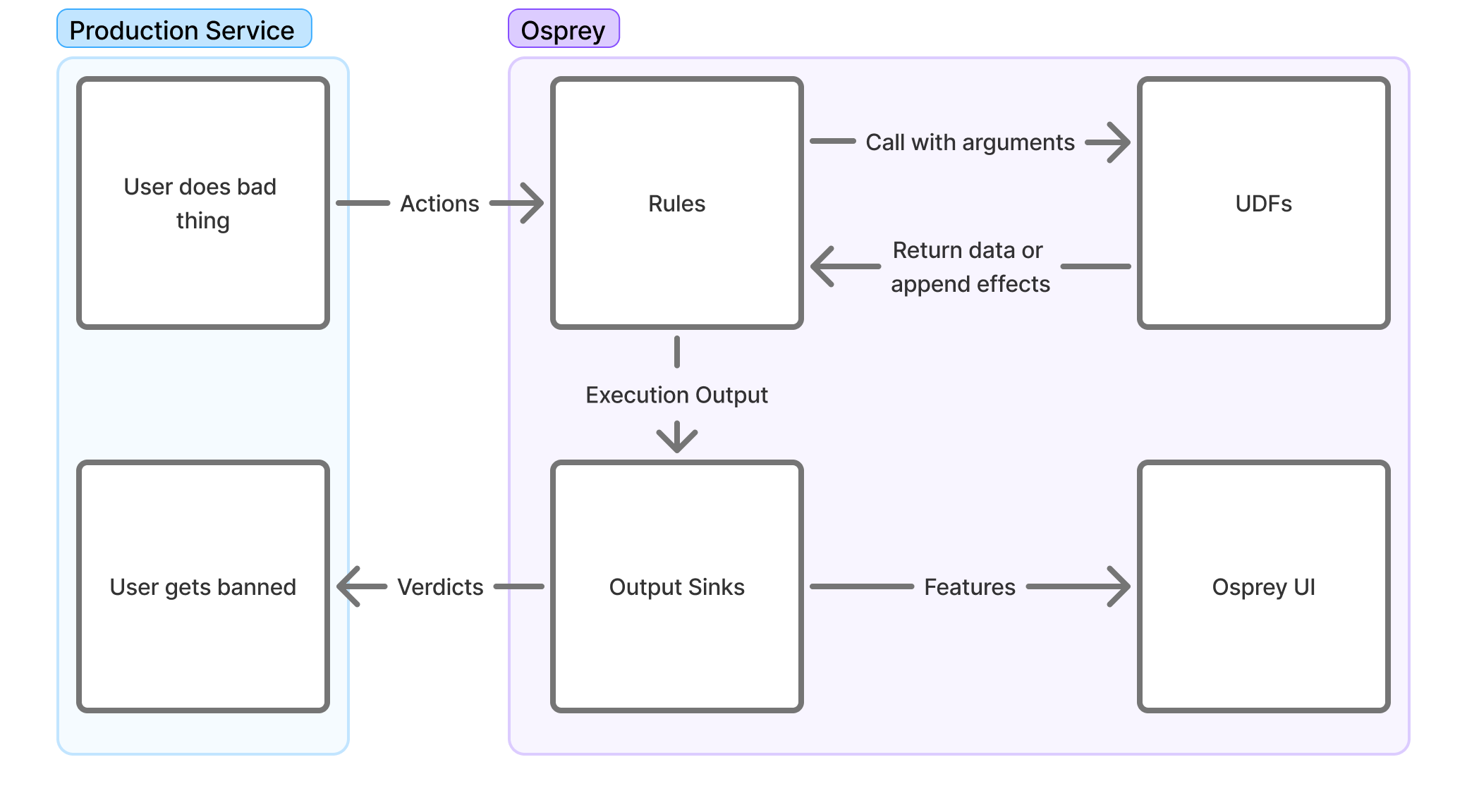
Creating Rules
Osprey rules are written in SML, a subset of Python with additional restrictions to simplify rule writing. You may write rules that are specific to single event types on a network, or ones that are applied to multiple event types.
By themselves, rules only create variables; without a corresponding WhenRules() function call, the rule will have no effects outside of evaluation and query functionality.
Rules currently support the following concepts through the Rule(...) function of the same name:
-
Name
Rule_Name = Rule(...)The rule’s name doubles as its identifier and as the boolean feature you can query in the Osprey UI to see individual rule hits. Renaming a rule after it’s active disconnects it from its historical query results, so name carefully.
-
Logic
when_all=[]The rule’s logic is the list of signals in the
when_allparameter; a signal can be a comparison over features, a label check, a UDF call, or another rule.If any signal in the list evaluates to
None, the whole rule evaluates toNone; see None values below. -
Description
description=f''A plain-language description of what the rule looks for, emitted alongside the rule to external systems like logging and ticketing. It’s an f-string, so you can interpolate feature values to show responders exactly what triggered the rule.
Here’s an example of a simple rule using various signal evaluations and out-of-the-box UDFs:
My_Rule_Name_v2 = Rule(
    when_all=[
        # Primary Signal
        MyFirstValue == True,
        HasLabel(entity=MyEntityName, label='MyLabel'),
        ListLength(list=UsersValues) == 5,
        # Secondary Signal
        RegexMatch(target=MyStringValue, pattern='(hello|world)'),
        MySecondValue >= 3,
        MyThirdValue != None,
        # Guardrail Signal
        (_LocalValue in [1, 2, 3, 5]) or (GlobalValue in ['hello', 'howdy']),
        not HasLabel(entity=MySecondEntityName, label='MySecondLabel'),
    ],
    description=f"{UserA} performed {ActionB} in this way. Emit warning",
)
Rule Structuring
You will likely find it useful to maintain two subdirectories inside of your main rules directory: a rules directory where actual logic will be added, and a models directory for defining the various features that occur in any or specific event types. For example, your structure may look something like this:
example-rules/
|  rules/
|  |  record/
|  |  |  post/
|  |  |  |  first_post_link.sml
|  |  |  |  index.sml
|  |  |  like/
|  |  |  |  like_own_post.sml
|  |  |  |  index.sml
|  |  account/
|  |  |  signup/
|  |  |  |  high_risk_signup.sml
|  |  |  |  index.sml
|  |  index.sml
|  models/
|  |  record/
|  |  |  post.sml
|  |  |  like.sml
|  |  account/
|  |  |  signup.sml
|  main.sml
The main.sml file at the root of your rules directory serves as the entry point. It uses Import and Require statements to control which other files are loaded and when, allowing you to compose together logic across the project. This sort of structure lets you define rules and models that are specific to certain event types so that only the necessary rules are run for various event types. For example, you likely have some rules that should only be run on a post event, since only a post will have features like text or mention_count.
Inside of each directory, you may maintain an index.sml file that will define the conditional logic in which the rules inside that directory are actually included for execution. Although you could handle all of this conditional logic inside of a single file, maintaining separate index.smls per directory greatly helps with neat organization.
See Workflow Structure and File Placement for more on Import and Require.
Models
Before you actually write a rule, you’ll need to define a “model” for an event type. For this example, we will assume that you run a social media website that lets users create posts, either at the “top level” or as a reply to another top level post. Each post may include text, mentions of other users on your network, and an optional link embed in the post. Let’s say that the event’s JSON structure looks like this:
{
	"eventType": "userPost",
	"user": {
		"userId": "user_id_789",
		"handle": "carol",
		"postCount": 3,
		"accountAgeSeconds": 9002
	},
	"postId": "abc123xyz",
	"replyId": null,
	"text": "Is anyone online right now? @alice or @bob, you there? If so check this video out",
	"mentionIds": ["user_id_123", "user_id_456"],
	"embedLink": "https://youtube.com/watch?id=1"
}
Inside of our models/record directory, we should now create a post.sml file where we will define the features for a post.
PostId: Entity[str] = EntityJson(
	type='PostId',
	path='$.postId',
)

PostText: str = JsonData(
	path='$.text',
)

MentionIds: List[str] = JsonData(
	path='$.mentionIds',
)

EmbedLink: Optional[str] = JsonData(
	path='$.embedLink',
	required=False,
)

ReplyId: Entity[str] = EntityJson(
	type='PostId',
	path='$.replyId',
	required=False,
)
The JsonData UDF lets us take the event’s JSON and define features based on the contents of that JSON. These features can then be referenced in other rules that we import the models/record/post.sml model into. If you have any values inside your JSON object that may not always be present, you can set required to False, and these features will be None whenever the feature is not present.
We did not create features for values like userId or handle because they’re present in any event; copying them into every event type’s model would get tedious. Instead, let’s define them once in a base.sml model. Inside of models/base.sml:
EventType = JsonData(
	path='$.eventType',
)

UserId: Entity[str] = EntityJson(
	type='UserId',
	path='$.user.userId',
)

Handle: Entity[str] = EntityJson(
	type='Handle',
	path='$.user.handle',
)

PostCount: int = JsonData(
	path='$.user.postCount',
)

AccountAgeSeconds: int = JsonData(
	path='$.user.accountAgeSeconds',
)
Here we use the EntityJson UDF for UserId rather than plain JsonData. UDFs are covered below, but as a rule of thumb, identifiers like user IDs should be entities; it pays off later when exploring data in the Osprey UI.
Model Hierarchy
In practice, you may find it useful to create a hierarchy of base models:
base.smlfor features present in every event (user IDs, handles, account stats, etc.)account_base.smlfor features that appear only in account related events, but always appear in each account related event. Similarly, you may add one likerecord_base.smlfor those features which appear in all record events.
This type of hierarchy prevents duplication (which Osprey does not allow) and ensures features are defined at the appropriate level of abstraction.
Effects with WhenRules
WhenRules() wires rules to effects: list Rule objects in its rules_any parameter, and when any of them evaluates true, the effects in then= fire. Osprey ships effect UDFs like DeclareVerdict(), LabelAdd(), and LabelRemove(); effects can also trigger external services through your output sinks.
Below is an example of a WhenRules() block that rejects the request and labels the user, email, and domain for verification follow-up:
WhenRules(
    rules_any=[
        Enabled_Rule_1,
        Enabled_Rule_2,
        # Disabled_Rule_1,
    ],
    then=[
        # Verdicts
        DeclareVerdict(verdict='reject'),
        # Labels
        LabelAdd(entity=UserId, label='recently_challenged', expires_after=TimeDelta(days=7)),
        LabelAdd(entity=UserId, label='verify', apply_if=NotVerified),
        LabelAdd(entity=Email, label='pending_verify'),
        LabelAdd(entity=Domain, label='recently_seen', expires_after=TimeDelta(days=7)),
    ],
)
WhenRules() must appear after the rules it references. Effects scattered throughout a file are hard to trace, so keep them together toward the bottom.
After evaluation, effects and the rest of the execution result are handed to your deployment’s output sinks. Data Flow covers where results go from there, and Integrations & Plugins covers adding output sinks of your own.
User Defined Functions (UDFs)
Nearly every function on this page—Rule, JsonData, EntityJson—is a UDF: a function implemented in Python and made available to SML. Osprey ships a standard library of them, and your deployment’s developers can register custom ones through plugins; writing a UDF in Python is covered in Integrations & Plugins § Writing UDFs.
The authoritative list of what’s callable in your deployment—with signatures, descriptions, and categories—is the in-app UDF Registry. The standard library includes general-purpose helpers like RegexMatch, ListLength, ParseInt (numeric string to integer), StringSlice (substring by index range), and the Hash* family, plus engine functions like GetActionName() and GetActionId() for the name and ID of the event being processed, and Experiment/ExperimentWhen for bucketing entities so a rule can roll out to a slice of traffic.
Custom UDFs are called from SML like any other function. The demo ruleset’s one rule is built on a custom TextContains UDF:
# example_rules/rules/post_contains_hello.sml
ContainsHello = Rule(
  when_all=[
    EventType == 'create_post',
    TextContains(text=PostText, phrase='hello'),
  ],
  description='Post contains the word "hello"',
)
Effect UDFs
Some UDFs don’t return a value to compare against; they produce an effect, a structured output that Osprey’s output sinks act on after evaluation—banning a user, reporting a post. Effect UDFs are called in the then= list of a WhenRules() block:
# example_rules/rules/post_contains_hello.sml
WhenRules(
  rules_any=[ContainsHello],
  then=[BanUser(entity=UserId, comment='User said "hello"')],
)
Implementing an effect UDF (and the output sink that consumes it) is plugin work; see Integrations & Plugins.
Labels
Labels are a standard plugin that enable stateful rules, and touch many parts of Osprey. They are effectively tags on various entities, which may be arbitrarily defined. Rules can add and remove labels as effects and check them as conditions, so past decisions inform future ones; Examples § Labels as state walks through that pattern end to end. For how labels behave in the UI, see User Guide → Investigate → Labels.
Creating Entities
Labels are applied to entities: features created with the EntityJson UDF, usually for values that stay consistent across events, like a user ID or email address.
# user.sml
UserId: Entity[str] = EntityJson(
  type='User',
  path='$.user_id'
)
A custom UDF can also create entities by declaring EntityT as its output type.
Notable Gotchas
None values
A rule or variable in SML is None when it doesn’t exist; a piece of data was missing, or a rule didn’t run. Unlike in many programming languages, a rule with a None signal is skipped entirely (and so are rules downstream of it) unless the rule checks for None explicitly. For example:
Thing: int = JsonData(path='$.property_that_doesnt_exist')

# Evaluates to False
MyFirstRule = Rule(
    when_all=[
        Thing != None,
    ],
    description=f'Thing is present',
)

# Skips evaluation and sets to None
MySecondRule = Rule(
    when_all=[
        Thing > 1,
    ],
    description=f'Thing is greater than 1',
)

# Skips evaluation and sets to None
MyThirdRule = Rule(
    when_all=[
        MySecondRule,
    ],
    description=f'MySecondRule matched',
)
Workflow Structure and File Placement
SML files can be composed to make your rules easier to understand. The Import statement includes rules and variables from other files.
# models/action_name.sml
ActionName = "foo"

# main.sml
Import(
    rules=[
        'models/action_name.sml',
        'models/http_request.sml',
    ]
)

MyRule = Rule(when_all=[ActionName == "foo"], description=f'Action is foo')
Require selectively runs other SML scripts. It supports templating and conditionals, so scripts can be skipped entirely; that matters when a rule or UDF is expensive to run, like a call to an AI service.
# main.sml
Require(rule=f'actions/{ActionName}.sml')  # will execute 'actions/foo.sml'

Require(rule='ai_services/my_ai_service.sml', require_if=ActionName == "register")
See Examples to put these concepts together into complete rulesets you can run and adapt.